

Online scams have become increasingly common, demanding greater attention to the links and online content we interact with daily. Cybercriminals are constantly creating new methods to deceive people for financial gain, ranging from falsified payment receipts to fake technician impersonations. In Brazil, around 71% of the population has already fallen victim to this type of crime, which shows the need for caution when clicking on links in WhatsApp messages, emails, or SMS, as well as avoiding sharing personal information with strangers. To reduce risks, it is essential to understand how these scams work, recognize their main types, learn what to do if you are targeted, and adopt preventive measures to protect your data and avoid financial losses.
This article is part of a series on digital security. You can read the other texts here.
This Content Is Only For Subscribers
To unlock this content, subscribe to INTERLIRA Reports.
Fake Bank Manager Scam
Receiving a call or message from your “bank manager” may sound reassuring… but it can actually be the start of a sophisticated scam. Criminals are increasingly impersonating bank employees to access accounts and steal money.
It looks official… and that’s the danger
The scam usually starts with a WhatsApp message or phone call. The fraudster introduces themselves as a bank manager or security agent, often using professional language and even real customer information to gain credibility. In some cases, the number displayed may appear to be from the bank itself.
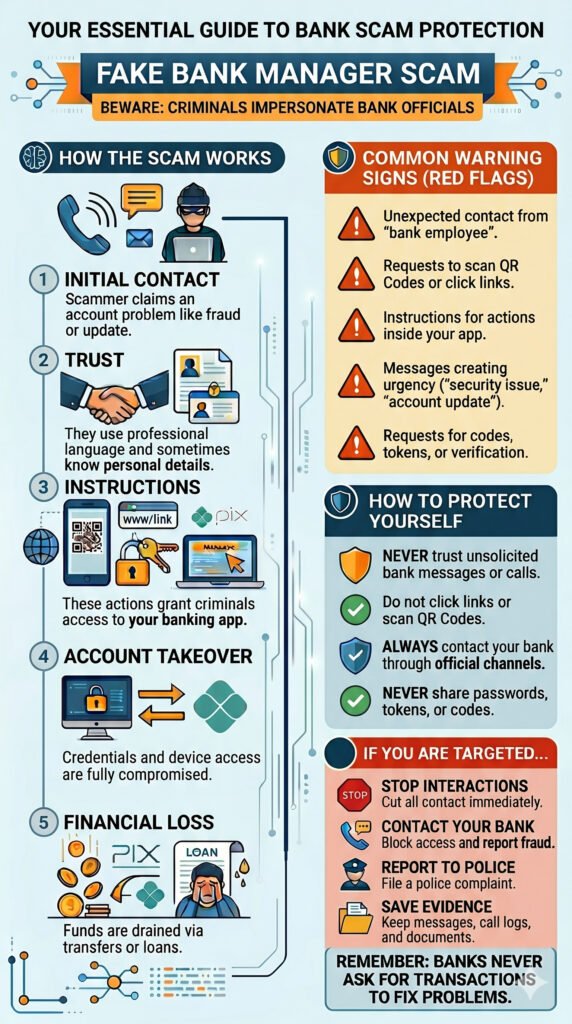
How the scam works
The approach follows a convincing step-by-step process:
- Initial contact: The scammer claims there is a problem with your account (fraud, irregular activity, or system update)
- Trust building: They provide details that make the story seem legitimate
- Instructions: You are asked to access links, scan QR Codes, or enter codes in your banking app
- Account takeover: These actions give criminals access to your account
- Financial loss: Unauthorized Pix transfers, withdrawals, or even loans are made in your name
Common warning signs
- Unexpected contact from a “bank employee”
- Requests to scan QR Codes or click on links
- Instructions to perform actions inside your banking app
- Messages creating urgency, such as “security issue” or “account update”
- Requests involving codes, tokens, or verification steps
How to protect yourself
Stay cautious and follow these key tips:
- Never trust unsolicited calls or messages claiming to be from your bank
- Do not click on links or scan QR Codes sent by third parties
- Always contact your bank through official channels to confirm any request
- Never share passwords, tokens, or verification codes
If you are targeted or fall for the scam
- Stop all interactions immediately
- Contact your bank right away to block access and report the fraud
- Report the incident to the police
- Save all evidence (messages, numbers, receipts)
Remember: banks never ask you to perform transactions to fix a problem.